Same prompt, same two documents, three models, 31 real errors. No model caught them all, and two of them drifted on the second run.
Curriculum teams are using AI to catch errors before print. The question isn't whether it works. It's which model to trust, how much, and what happens when you run it more than once.
We ran a controlled test: same prompt, same two-document setup (curriculum guide + reference document), three models. Then we ran it again with a second lesson in the same chat session to check for drift.
How We Ran It
We used two real curriculum documents: a curriculum guide in PDF format and its corresponding reference document. Both were production files at the proofreading stage, not drafts.
The same prompt ran in three separate sessions, one per model: Gemini, ChatGPT, and Claude. Each session was fresh. Each model received both PDFs and the same system instructions.
After scoring the first round, we ran a second document (a different lesson, same document types) through each model in the same chat session to test for drift. A model that behaves differently on run two, without any change to the prompt or documents, is flagging a reliability problem that matters for teams doing this at scale.
The Prompt
We used the same prompt for all three models. If you want to run this yourself, here it is.
You are reviewing a curriculum guide PDF before publication. You have two jobs: proofread it, and compare it against the attached reference document. Read every page of both in full. Report only issues you can point to in the files.

Part 1: Proofreading
- Typos, duplicate words, and missing words.
- Spacing problems, including double spaces, smashed or merged text with no spaces, and spacing in answer keys.
- Grammar, punctuation, and capitalization.
- Terminology and spelling consistency across the document, for example "Learning Objectives" versus "learning objectives," or "worksheet" versus "work sheet."
- Titles and headings that differ between sections of the same document.
- Unfilled placeholders, such as Lorem ipsum, brackets, or TBD.
- Wrong handouts, materials, or cross-references.

Part 2: Reference document comparison
- Content in the curriculum guide that is missing from the reference document, or the reverse.
- Wording that differs between the two documents, including terminology, numbers, units, and names.
- Steps, questions, or answer key items that are reordered, dropped, or added.
- Titles, headings, and handout names that don't match.
- Treat the reference document as the source of truth unless an editorial note says otherwise.

Existing editorial notes
List any existing editorial comment annotations separately. Don't count them as new errors.

Rules
- Do not use em-dashes in your output.
- Do not flag spaced-letter design headers.
- Do not flag map or diagram labels that run into body text during extraction.
- Do not rewrite or suggest style changes. Flag errors only.
- If you can't tell whether something is a real error or a PDF rendering artifact, say so.

Output format
Two numbered lists, one for proofreading and one for reference document mismatches. For each item give the page number, the exact text as written, what's wrong, and the suggested fix. End with a count for each list.
It separates proofreading from comparison so you can score each independently. The rules section is where models diverge the most. We'll come back to that.
Round 1: What We Found
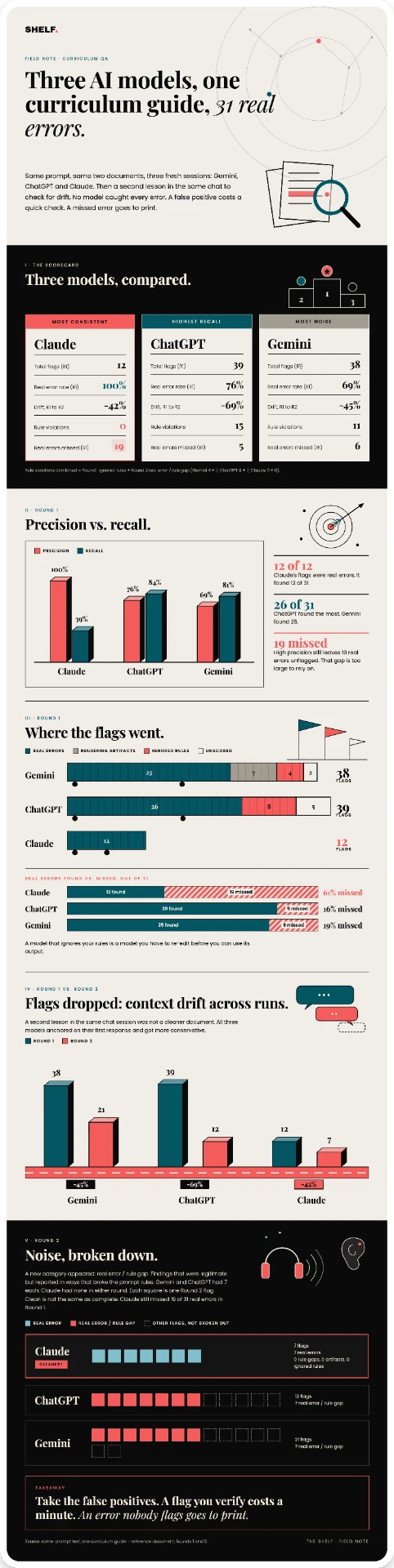
There were 31 confirmed real errors in the document. No model caught them all.
| Model | Flags | Real errors | Precision | Recall |
|---|---|---|---|---|
| Claude | 12 | 12 | 100% | 39% |
| ChatGPT | 39 | 26 | 76% | 84% |
| Gemini | 38 | 25 | 69% | 81% |
Claude's flags were worth acting on immediately. Every single one was a real error. But if you only ran Claude, you'd walk away thinking the document was cleaner than it was. You'd miss 19 real errors, including a terminology inconsistency running across four pages, two garbled phrases, and a wrong measurement in a diagram.
ChatGPT had the highest recall, finding 26 of 31. Gemini was close at 25. Both generated significant noise. Gemini produced 7 rendering artifact flags (things that looked like errors but were PDF extraction quirks) and 4 rule violations. ChatGPT racked up 8 rule violations, meaning it found real things but reported them in ways that broke the prompt instructions.
The prompt adherence gap matters as much as the coverage gap in production QA. A model that ignores your rules is a model you have to re-edit before you can use its output.
A model that ignores your rules is a model you have to re-edit before you can use its output.
Round 2: The Drift Problem
We ran a second lesson through each model in the same chat session and scored the results the same way. Volume collapsed across the board.
| Model | Round 1 flags | Round 2 flags | Drop |
|---|---|---|---|
| Gemini | 38 | 21 | -45% |
| ChatGPT | 39 | 12 | -69% |
| Claude | 12 | 7 | -42% |
This wasn't a cleaner document. That's context drift. Running in the same chat thread, all three models anchored on their first response and got more conservative on the second pass.
A new category emerged in Round 2: real error / rule gap. These were legitimate findings, real errors the model caught, but reported in ways that violated the prompt rules. Gemini and ChatGPT each had 7 of these in Round 2. Claude had zero in both rounds.
What this means: even when Gemini and ChatGPT found something real in Round 2, they were increasingly sloppy about how they reported it. Claude stayed disciplined. Its flags in Round 2 were still 100% clean, just fewer of them.
Context drift is a real operational problem. A team running weekly QA across a full program, lesson after lesson in the same session, will get progressively noisier and less complete output from two of these three models.
What This Means for Your Workflow
No single model is sufficient for production QA. That's the honest read.
If your priority is signal-to-noise, Claude is the noise filter. Every flag it raises is worth investigating. It won't waste your reviewer's time with artifacts or rule-broken suggestions. But it won't catch everything, and that gap is significant enough that you can't rely on it alone.
If your priority is coverage, ChatGPT or Gemini will surface more. But you'll need a trained reviewer to sort real errors from artifacts and rule violations before that output is actionable. That's a labor cost.
The most defensible workflow for teams doing this at scale is a two-model run: Claude plus one of the higher-recall models, in separate sessions. Use the high-recall model to generate a broad flag list. Use Claude as the cross-check. Items both catch are almost certainly real. Items only one catches require human judgment. Items only Claude catches are low-noise and worth prioritizing.
On the drift problem: start a fresh session for each document, or at minimum each lesson. Don't chain multiple documents through the same chat. The data shows all three models degrade when run in sequence, and two of them degrade in ways that make their output harder to use, not just smaller.
A tool you can't run twice without behavioral degradation isn't a reliable part of your workflow.
Bottom Line
ChatGPT and Gemini found more. Claude found consistently. Which matters more depends on whether you're doing a one-time check or building a repeatable QA process. For teams running this across a full curriculum program, the consistency finding is the more important one. A tool you can't run twice without behavioral degradation isn't a reliable part of your workflow. Claude's 100% precision and stable behavior across both rounds makes it the right anchor for any AI-assisted QA system, with a higher-recall model running alongside it for coverage.
The main cost is running two models instead of one, and one extra model run is worth 19 fewer missed errors.